共计 5114 个字符,预计需要花费 13 分钟才能阅读完成。
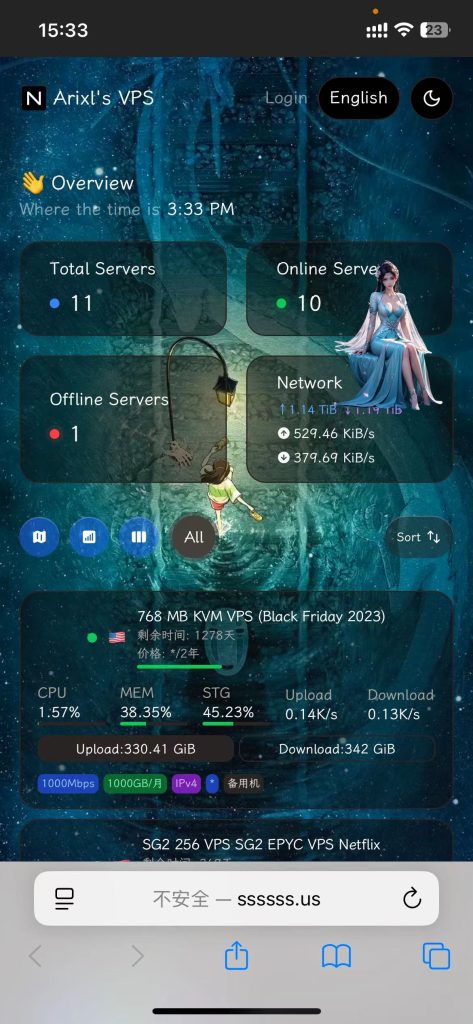
手机端效果图:
PC 端效果图:
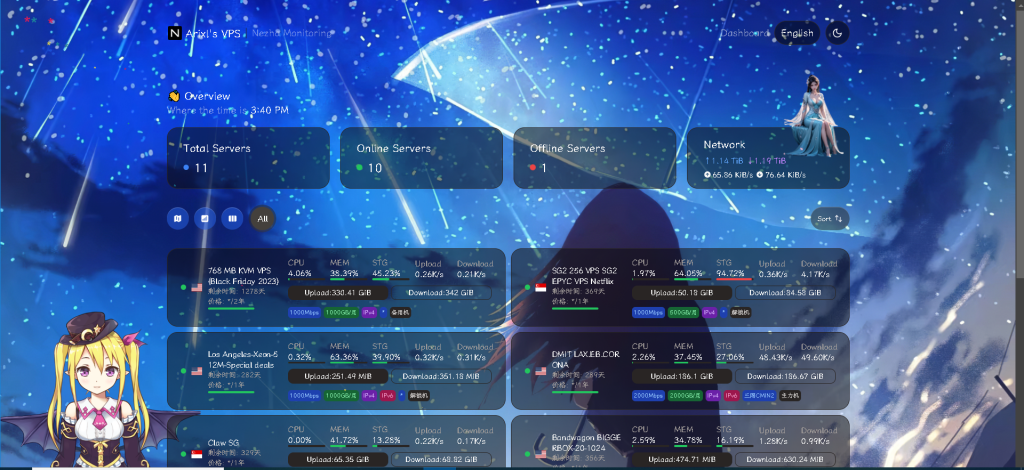
主题代码:
<script>
window.CustomMobileBackgroundImage="https://img.imgdd.com/f210f3.3ff9ce8c-bbcb-4533-a1cb-eb99fcbb826d.jpeg";
window.ShowNetTransfer  = "true"; /* 卡片显示上下行流量 */
</script>
<script>
    // 动态加载字体样式表
    var link = document.createElement('link');
    link.rel = 'stylesheet';
    link.href = 'https://s4.zstatic.net/ajax/libs/lxgw-wenkai-screen-webfont/1.7.0/lxgwwenkaiscreenr.css';
    document.head.appendChild(link);
</script>

<style>
    /* 设置默认字体 */
    * {font-family: 'LXGW WenKai Screen R';}
    h1, h2, h3, h4, h5 {font-family: 'LXGW WenKai Screen R', sans-serif;}
</style>

<script>
    window.CustomBackgroundImage = "https://img.imgdd.com/f210f3.39c59c2b-19e0-454e-9ef9-da81d9d7fa2f.jpg";  /* 页面背景图 */
</script>

<!-- 加载特效脚本 -->
<script src="https://cdn.jsdelivr.net/gh/mocchen/cssmeihua/js/aixin.js"></script> <!-- 点击爱心特效 -->
/* 页面樱花效果 */
<script src="https://fastly.jsdelivr.net/gh/stevenjoezhang/live2d-widget@latest/autoload.js"></script>
<script src="https://cdn.jsdelivr.net/gh/mocchen/cssmeihua/js/xiaoxingxing.js"></script> <!-- 鼠标特效 -->

<!-- 鼠标特效容器 -->
<span class="js-cursor-container"></span> <!-- 确保在页面 <body> 内正确位置 -->

<style>
  .dark .bg-card {
   font-family: "Roboto", "Segoe UI", "Helvetica Neue", Helvetica, Arial, sans-serif;
    color: #ffffff; /* 白色,高对比度 */
    position: relative; /* 设置元素为相对定位 */
    background-color: rgba(0, 0, 0, 0.3); /* 设置背景颜色为半透明的黑色 */
    backdrop-filter: blur(5px); /* 应用毛玻璃效果,模糊度为 5 像素 */
    border-radius: 15px; /* 设置边框圆角为 15 像素 */
    //box-shadow: 0 6px 8px rgba(0, 0, 0, 0.1); /* 添加阴影效果 */
    //overflow: hidden;  /* 确保内容不会溢出容器 */
    }
  .dark .bg-card h1, .dark .bg-card h2, .dark .bg-card h3 {color: #ffffff; /* 保持标题的高对比度 */}
  .dark .bg-card p {color: #eeeeee; /* 段落文本稍微柔和一些 */}
</style>

<script>
window.CustomMobileBackgroundImage="https://img.028029.xyz/1734591983003.png";
</script>
<script>
var observer = new MutationObserver(function(mutationsList, observer) {var xpath = "/html/body/div/div/main/div[2]/section[1]/div[4]/div";
    var container = document.evaluate(xpath, document, null, XPathResult.FIRST_ORDERED_NODE_TYPE, null).singleNodeValue;

    if (container) {observer.disconnect();
        var existingImg = container.querySelector("img");
        if (existingImg) {container.removeChild(existingImg);
        }
        var imgElement = document.createElement("img");
        imgElement.src = "https://img.028029.xyz/1734498853435.png";
        imgElement.style.position = "absolute";
        imgElement.style.right = "8px";
        imgElement.style.top = "-80px";
        imgElement.style.zIndex = "10";
        imgElement.style.width = "90px";
        container.appendChild(imgElement);
    }
});
var config = {childList: true, subtree: true};
observer.observe(document.body, config);
</script>
公开备注代码:
{
   "billingDataMod": {
       "startDate": "2024-06-24T00:00:00+08:00",
       "endDate": "2028-06-24T00:00:00+08:00",
       "autoRenewal": "1",
       "cycle": "2 年",
       "amount": "*"
   },
   "planDataMod": {
       "bandwidth": "1000Mbps",
       "trafficVol": "1000GB/ 月",
       "trafficType": "1",
       "IPv4": "1",
       "IPv6": "0",
       "networkRoute": "*",
       "extra": "备用机"
   }
}
2025/2/18 更新:
主题设置:
<script>
window.CustomMobileBackgroundImage="https://oracle.ssssss.us/i/2025/02/03/128mtwr.jpeg";
</script>
<script>
window.CustomBackgroundImage="https://oracle.ssssss.us/i/2025/02/04/ezlaxm.jpg"; /* 页面背景图 */
</script>
<script src="https://cdn.jsdelivr.net/gh/mocchen/cssmeihua/js/aixin.js">
</script>/* 点击爱心特效 */

/* 页面樱花效果 */

<span class="js-cursor-container"></span>
<script src="https://fastly.jsdelivr.net/gh/stevenjoezhang/live2d-widget@latest/autoload.js"></script>
<script src="https://cdn.jsdelivr.net/gh/mocchen/cssmeihua/js/xiaoxingxing.js"></script>
/* 以上鼠标特效 */
<script>
var observer = new MutationObserver(function(mutationsList, observer) {var xpath = "/html/body/div/div/main/div[2]/section[1]/div[4]/div";
    var container = document.evaluate(xpath, document, null, XPathResult.FIRST_ORDERED_NODE_TYPE, null).singleNodeValue;

    if (container) {observer.disconnect();
        var existingImg = container.querySelector("img");
        if (existingImg) {container.removeChild(existingImg);
        }
        var imgElement = document.createElement("img");
        imgElement.src = "https://oracle.ssssss.us/i/2025/02/03/12cw6f4.png";
        imgElement.style.position = "absolute";
        imgElement.style.right = "8px";
        imgElement.style.top = "-90px";
        imgElement.style.zIndex = "10";
        imgElement.style.width = "90px";
        container.appendChild(imgElement);
    }
});
var config = {childList: true, subtree: true};
observer.observe(document.body, config);
</script>

<style>
  .dark .bg-card {
   font-family: "Roboto", "Segoe UI", "Helvetica Neue", Helvetica, Arial, sans-serif;
    color: #ffffff; /* 白色,高对比度 */
    position: relative; /* 设置元素为相对定位 */
    background-color: rgba(0, 0, 0, 0.3); /* 设置背景颜色为半透明的黑色 */
    backdrop-filter: blur(5px); /* 应用毛玻璃效果,模糊度为 5 像素 */
    border-radius: 15px; /* 设置边框圆角为 15 像素 */
    //box-shadow: 0 6px 8px rgba(0, 0, 0, 0.1); /* 添加阴影效果 */
    //overflow: hidden;  /* 确保内容不会溢出容器 */
    }
  .dark .bg-card h1, .dark .bg-card h2, .dark .bg-card h3 {color: #ffffff; /* 保持标题的高对比度 */}
  .dark .bg-card p {color: #eeeeee; /* 段落文本稍微柔和一些 */}
</style>

<script>
  window.ForceTheme = 'dark'
</script>
公开备注 1:
{
"billingDataMod": {
"startDate": "2024-09-30 09:14:33+08:00",
"endDate": "2024-10-30 09:14:33+08:00",
"autoRenewal": "1",
"cycle": "月",
"amount": "$48"
},
"planDataMod": {
"bandwidth": "1000Mbps",
"trafficVol": "1000GB/ 月",
"trafficType": "1",
"IPv4": "1",
"IPv6": "1",
"networkRoute": "4837",
"extra": ""
}
}
公开备注 2:
{
"billingDataMod": {
"startDate": "2024-04-15 09:14:33+08:00",
"endDate": "2025-04-15 09:14:33+08:00",
"autoRenewal": "1",
"cycle": "年",
"amount": "$35.42"
},
"planDataMod": {
"bandwidth": "1500Mbps",
"trafficVol": "750GB/ 月",
"trafficType": "2",
"IPv4": "1",
"IPv6": "0",
"networkRoute": "CN2GIA CMIN2",
"extra": ""
}
}
正文完
